
UHD vs 4K: Is There a Difference? (3840 vs 4096 Explained)
For anything you watch at home, there is no difference. A "4K" TV, a phone that records "4K", a monitor sold as "4K UHD" and YouTube's 2160p option all mean the same thing: 3840 × 2160 pixels, the size the standards call UHD.
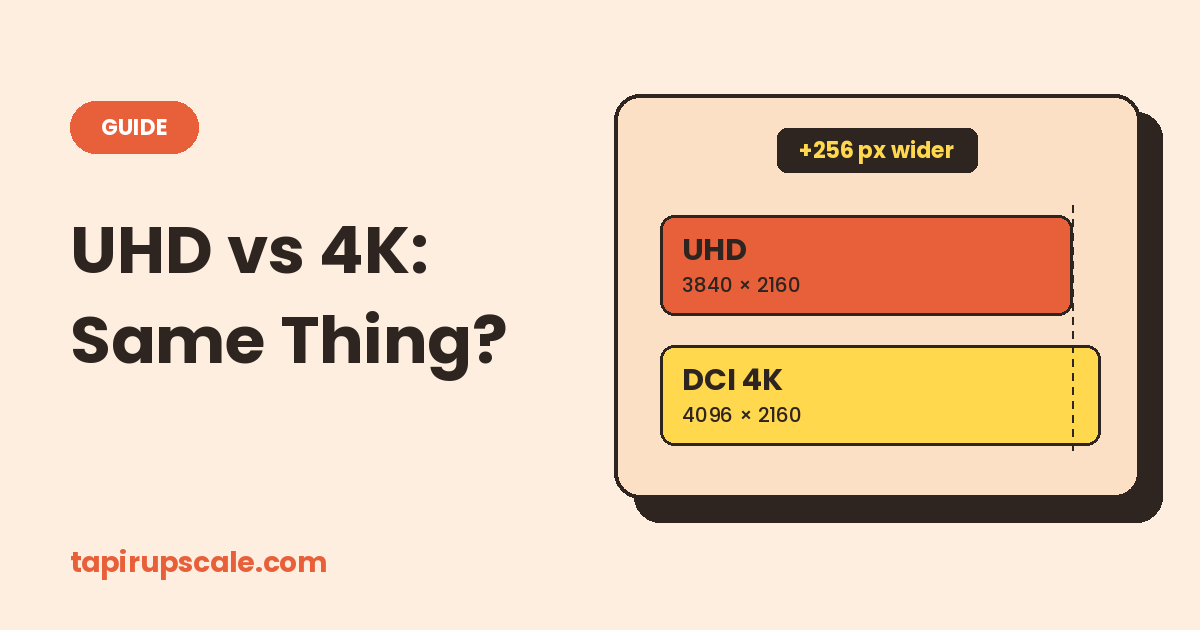
The other 4K comes from cinema. DCI 4K is 4096 × 2160: the same height, 256 pixels wider. It's what digital cinema projectors use and what some cameras offer as "C4K" or "DCI 4K". You only need to care about it if you shoot with one of those cameras or deliver films to a cinema.
Got a 1080p clip? Take it to UHD 4K
Free in your browser, or on a cloud GPU with Pro.
- No sign-up
- No watermark
- Up to 4K

The two 4Ks side by side 📊
| UHD (consumer 4K) | DCI 4K (cinema 4K) | |
|---|---|---|
| Pixels | 3840 × 2160 | 4096 × 2160 |
| Total pixels | about 8.3 million | about 8.8 million |
| Shape | 16:9 (1.78:1) | about 1.9:1 |
| Defined by | ITU-R BT.2020 and the US consumer electronics industry (CEA, now CTA) | Digital Cinema Initiatives (DCI), the Hollywood studios' standard |
| Where you meet it | TVs, monitors, phones, streaming, YouTube, Blu-ray | Cinema projection, cinema cameras, film post-production |
| Other names | 4K, 4K UHD, Ultra HD, 2160p | C4K, Cinema 4K, 4K DCI |
So DCI 4K has about 7% more pixels, all of them in the width. The height, 2160 lines, is identical. That's why both get called "2160p" and why the confusion never quite goes away.
Why one name ended up meaning two things 🏷️
"4K" started as a cinema term. Digital Cinema Initiatives defined digital projection around a 4096 × 2160 container, and the "4K" refers to that width of roughly four thousand pixels.
When TVs with four times the pixels of Full HD arrived in 2012, they used 3840 × 2160 instead. That's exactly 1920 × 1080 doubled in each direction, so HD content scales up cleanly and the shape stays 16:9. The same year the ITU published BT.2020, the broadcast standard for this size, and the US Consumer Electronics Association chose the name "Ultra High-Definition" for these screens.
Manufacturers kept saying "4K" anyway, because it was shorter and already familiar. By 2014 the industry settled on "4K Ultra HD" as the common label. In everyday use, 4K now simply means UHD.
Is 4K better than UHD? 🤔
Not in any way you'd notice at home. The extra 256 pixels of DCI 4K make the picture wider, not sharper. Detail per inch is the same, because the height is the same.
What actually differs is the shape. A 4096 × 2160 video doesn't fit a 16:9 screen exactly, so the player does one of two things:
- Shrinks it to fit the width, leaving thin black bars at the top and bottom.
- Crops a little off each side to fill the screen.
Either way you're watching it at roughly UHD size. On a TV, DCI 4K is never "more 4K" than UHD.
Labels like 4K HDR, QLED or OLED describe colour, brightness and panel type, not resolution. Almost every TV sold as 4K has a 3840 × 2160 panel.
What it means for your own videos 🎥
If your phone records 4K, it's UHD. iPhones and Android phones record 3840 × 2160 in their 4K mode, ready for YouTube and TVs as is.
If your camera offers both, pick by where the video is going:
- UHD for YouTube, social, TV and most client work. It plays full screen with no bars or cropping.
- DCI 4K for cinema delivery, or when you want a bit of extra width to reframe later. Expect to crop or letterbox it for 16:9 screens.
Keep your edit at one size. Mixing DCI and UHD clips on one timeline means some of them get scaled or cropped. Set the timeline to the size you'll export, usually 3840 × 2160.
Upscaling to 4K means upscaling to UHD. A 1080p clip doubled in each direction lands exactly on 3840 × 2160, with no cropping or odd sizes. That's why a 2x AI upscale is the clean path from Full HD to 4K. You can upscale a 1080p clip to UHD here, and Is upscaling 1080p to 4K worth it? covers when the bigger file pays off.
HD, Full HD, UHD and 8K in one line each 📏
- HD (720p): 1280 × 720
- Full HD (1080p): 1920 × 1080
- UHD 4K (2160p): 3840 × 2160, four times Full HD
- 8K UHD (4320p): 7680 × 4320, four times UHD
Every step up from Full HD doubles the width and the height. The full list, including vertical and older sizes, is in our video resolution chart.
Quick answers
Is UHD the same as 4K? For TVs, monitors, phones and streaming, yes: both mean 3840 × 2160. Strictly speaking, cinema 4K is 4096 × 2160.
Is 2160p 4K? Yes. 2160p is the UHD size, 3840 × 2160, which is what 4K means for home video and YouTube.
Is DCI 4K sharper than UHD? No. It's 256 pixels wider with the same height, so the extra pixels add width, not detail.
Should I export in UHD or DCI 4K? UHD, unless the video is going to a cinema or someone has asked for DCI. UHD fits 16:9 screens exactly.
Is 8K also UHD? Yes. 7680 × 4320 is called 8K UHD. The 3840 × 2160 size is sometimes called 4K UHD to tell them apart.
Can I turn a 1080p video into UHD? Yes. Doubling 1920 × 1080 gives exactly 3840 × 2160. An AI upscaler redraws edges and texture at the new size, so it looks sharper than a plain resize, though it can't add detail the camera never recorded.
Got a video to sharpen?
Free in your browser, or on a cloud GPU with Pro.
- No sign-up
- No watermark
- Up to 4K